
- Internal:
- Life Happens Due To You
- External:
- Life Happen To You
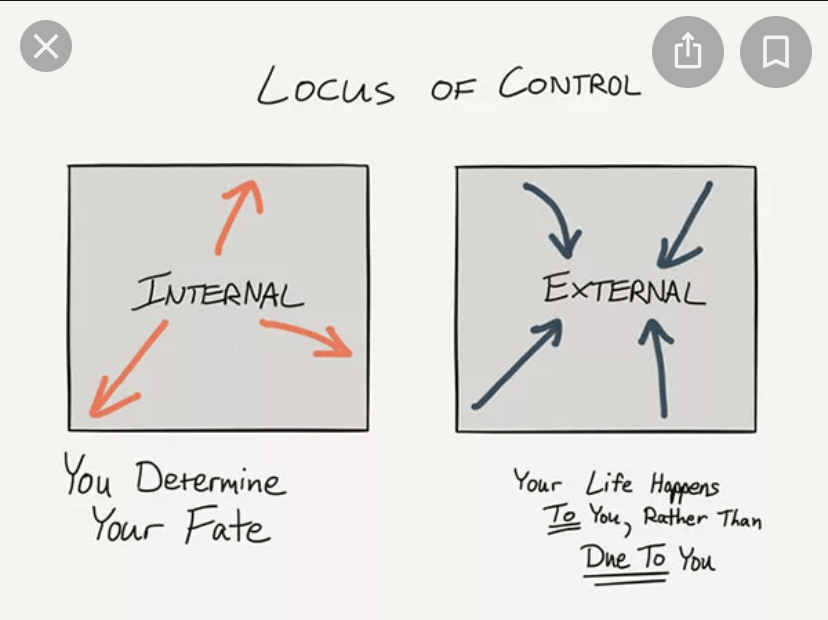
**Picture is not my own
**Picture is not my own
Did You Know?..
You can run shell commands from within VIM?
Here’s how 👇
I’m developing more YouTube videos and one of them is: Introduction to TMUX
Here’s what I have so far:
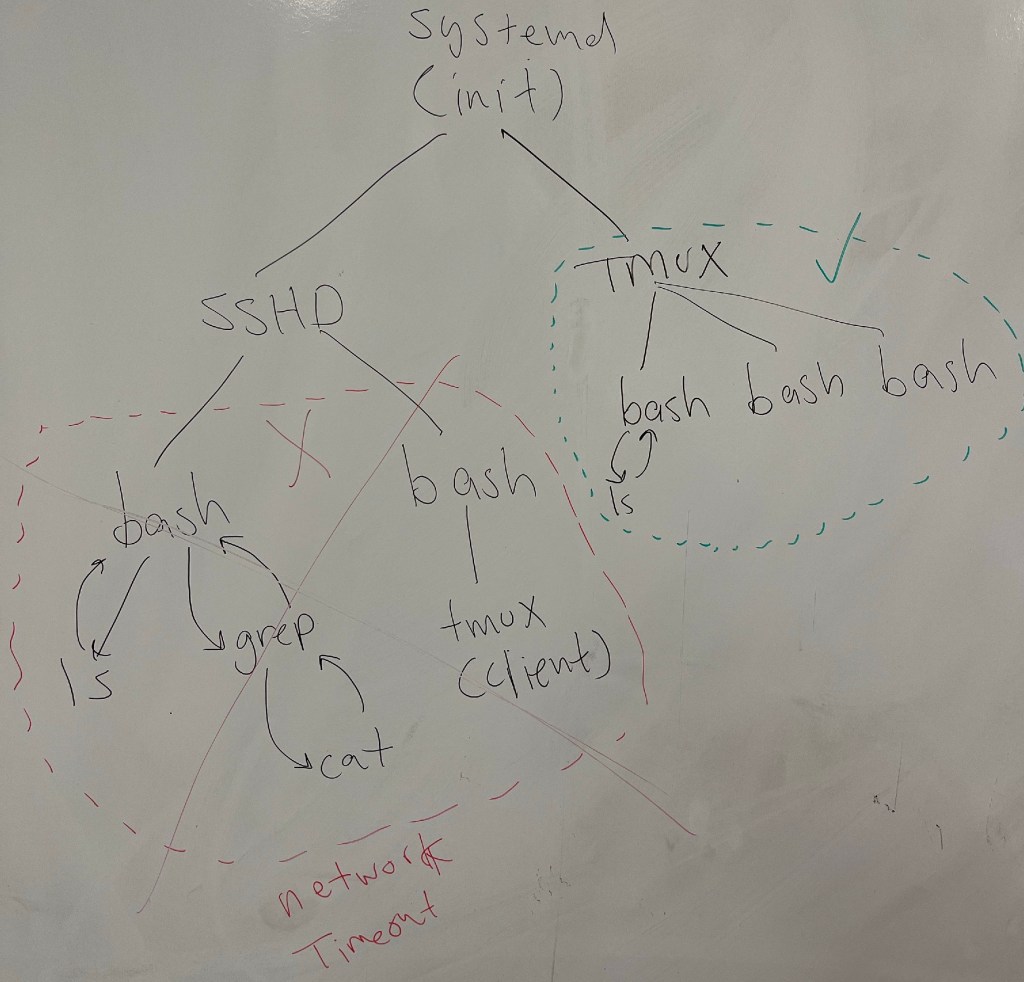
A couple of things to note:
Did you know?..
When merging 2 divergent branches in Git, you perform a Recursive (or 3-Way) Merge.
This involves the two branch tips and the common ancestor.
This video shows you what that looks 👀 like.
VIM has a “find and replace” feature called string substitution:

Here’s a quick introduction by me:
If you are sick of re-entering your SSH passphrase per login shell 😒…
eval $(ssh-agent -s )
ssh-add /home/user1/.ssh/id_rsa

# View loaded keys
ssh-add -l

# Test "agent process"
ssh -i /home/user1/.ssh/id_rsa user1@remote1

Keychain will allow you to enter your SSH passphrase per system reboot, 😲
How???
Keychain will automatically re-use your pre-existing ssh-agent process and have instant access to any pre-loaded keys and passphrases.

**Keychain is just a front-end to ssh-agent
Below are the steps I took in the Keychain playlist.
You may have to adjust some parameters for your environment but the Linux commands should be the same.
# Generate your SSH keypair (Public/Private)
# Public Key ends with a *.pub
# Private Key has no extension
ssh-keygen

# Copy Public Key to host(s)
ssh-copy-id -i /home/user1/.ssh/id_rsas.pub user1@remote1

# Test Private Key
ssh -i /home/user1/.ssh/id_rsa user1@remote1
# Install keychain
sudo apt-get install keychain

# Add the following to your  "~/.bashrc"
eval `keychain --eval --agents ssh /home/user1/.ssh/id_rsa`

# Test keychain
ssh user1@remote1
Here I explain the concepts that make up ssh key authentication and keychain:
Here, I show you how to actually implement keychain:
I read from @david_perell writing is as much discovery as it is refining your thinking.
So true!
I’m writing my script for a new YouTube video and what began as:
“what do I talk about on this subject”
is turning into:
“Oh wait, I forgot about that”
And
“Ooh, and I forgot about this too”.
I 💓it!!!!
Here’s 2 ways to view the same state information with ‘systemctl’.

systemctl --lines 0 status sshd.servicesystemctl list-units sshd.serviceIf you read plenty of personal development literature, you always here the concept of Personal Responsibility.
But what does it REALLY MEAN and how do you practice this???
Here’s one way to ACTUALLY PRACTICE Personal Responsibility:
Don’t focus on resources, focus on resourcefulness
Can’t remember and too lazy to look up
If you focus on recourses, you’re likely to focus on what you DON’T HAVE. Essentially deferring the solution-seeking.
If you focus on resourcefulness, you’re looking at what you DO HAVE and making the most of that. And exercising your free agency.
This takes creativity and a little bit of courage.
Keep in mind though, that
Wisdom is the timely application of knowledge
@DandapaniLLC (Twitter)
Sometimes you DO need more resources; and sometimes resourcefulness is not enough.
But don’t ASSUME you always need more resources before you’ve had an honest look at yourself first.
Sometimes, just sometimes: Good enough is good enough.

