
Part 1
Using TMUX but can’t scroll your output? This video is for you!
Here we introduce TMUX’s Copy Mode.
Copy Mode is how you
- View
- Search and
- Copy your TMUX history
Summary of Copy Mode Commands (defaults)
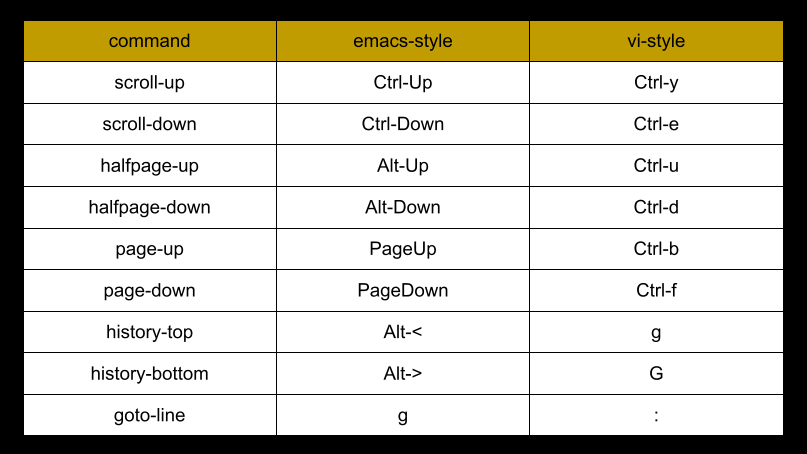
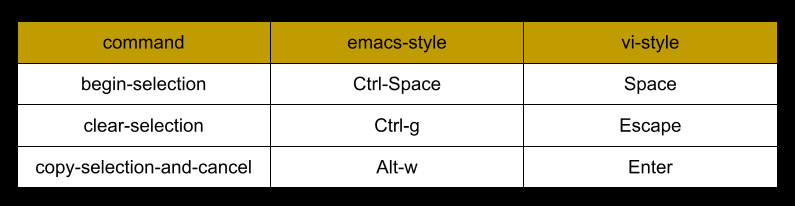
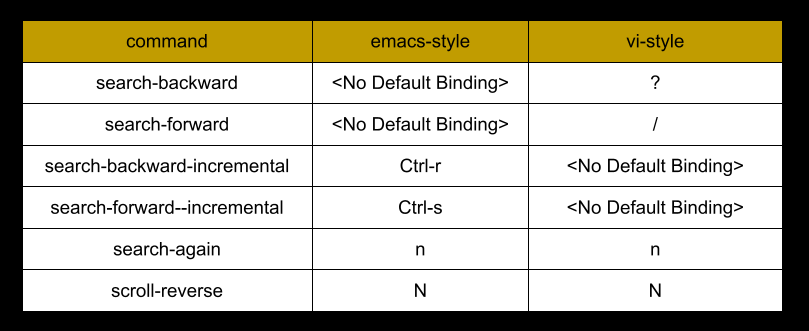
Summary of TMUX Commands
# Display current value for option 'mode-keys'
show-options -g mode-keys

# Set to vi-style key bindings
set-option -g mode-keys vi

# Set to emacs-style key bindings
set-option -g mode-keys emacs
Part 2
Summary of TMUX Commands
# Set key binding mode to vi OR emacs
set-option -g mode-keys vi
set-option -g mode-keys emacs

# List emacs key bindings
list-keys -T copy-mode C-r
list-keys -T copy-mode C-s

# List Vi key bindings
list-keys -T copy-mode-vi ?
list-keys -T copy-mode-vi /
list-keys -T copy-mode-vi L
list-keys -T copy-mode-vi M
list-keys -T copy-mode-vi H

# Redefine Vi searching
bind-key -T copy-mode-vi ? command-prompt -i -I "#{pane_search_string}" -p "(search up)" "send -X search-backward-incremental \"%%%\""
bind-key -T copy-mode-vi / command-prompt -i -I "#{pane_search_string}" -p "(search down)" "send -X search-forward-incremental \"%%%\""

# Redefine Emacs commands:
# bottom-line
# middle-line and
# top-line
bind-key -T copy-mode L send-keys -X bottom-line
bind-key -T copy-mode M send-keys -X bottom-line
bind-key -T copy-mode H send-keys -X bottom-line

